This post was written by the Tanium Guardian team.
An Integrated Development Environment, or IDE, is a software application designed to write, edit, test, and build code using a desktop computer. Visual Studio Code is a popular free editor from Microsoft that is built on an open-source core. The VS Code core also serves as the basis for several other IDEs, such as Cursor, Windsurf, and VSCodium, which are rapidly gaining adoption in enterprise environments.
VS Code and its forks allow for functionality expansion through “extensions.” These extensions range from simple UI tweaks to advanced features like language support and task automation. Critically, these extensions can provide code execution within the IDE and execute code at the privilege level of the IDE process.
Like browser extensions, these helpful utilities number in the tens of thousands. The rich developer ecosystem means that users can find an extension for almost any conceivable need such as code beautification, linting, and integration with other development tools. There are even some lighthearted options like VS Code Pets, reminiscent of the old-school eSheep application from the 1990s.
Users can obtain extensions from the Visual Studio Code Marketplace (Microsoft), the OpenVSX Registry (Eclipse Foundation), or install them locally.
Given the popularity of the IDEs, the potential for elevated privileges and sensitive data access by the IDE’s end user, and relative ease of extension publication, attackers have been increasingly leveraging extensions for nefarious purposes.
The threat research written by Aqua Security and Truvis Thorton in 2023 and first reported in the wild by Palo Alto in late 2024 now feels like an almost weekly occurrence. MITRE added IDE Extensions as an ATT&CK TTP in March 2025.
How do IDE extensions work?
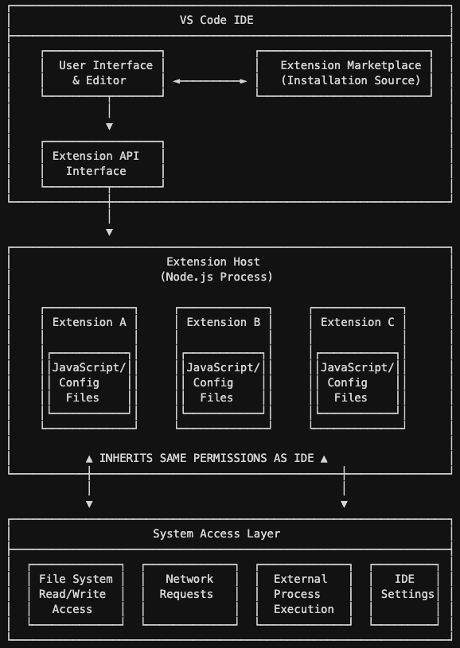
Extensions are packaged code and/or configuration files that plug directly into the VS Code user interface and can leverage the same Application Programming Interfaces (APIs) available to VS Code. After installation, extensions are run within the “Extension Host” launched by VS Code. This is a Node.js process running with the IDE.
The “Extension Host” has the same permissions as the IDE, so any action that can be taken by the IDE can also be taken by an extension. This includes, but is not limited to, reading and writing files on the endpoint, making network requests, running external processes, and modifying IDE settings. Extensions are primarily JavaScript-based code but can inject malicious code in other languages via VS Code APIs.
What is the risk?
In the worst cases of IDE extension abuse, victims may find themselves exposing sensitive data—including credentials and access tokens—through attacker exfiltration or becoming victims of ransomware.
There’s a saying in the security community that “malware only does what it’s allowed to do,” which is a simplified way of explaining how overly permissive settings and user accounts with too much administrative control can be such a risk to an organization.
Malicious VS Code extensions will run with the permissions of the user who loaded it into their VS Code profile. It is not uncommon for developers to have higher permissions on their workstation to facilitate debugging and configuration changes required for their jobs, and this is exactly why they make such an attractive attack target.
For the Microsoft-managed Visual Studio Extensions Marketplace, Microsoft does provide protection against malicious extensions and has increased these protections over time. Every extension and subsequent updates are scanned for viruses using multiple antivirus engines. Extensions are also examined at runtime in a sandbox environment.
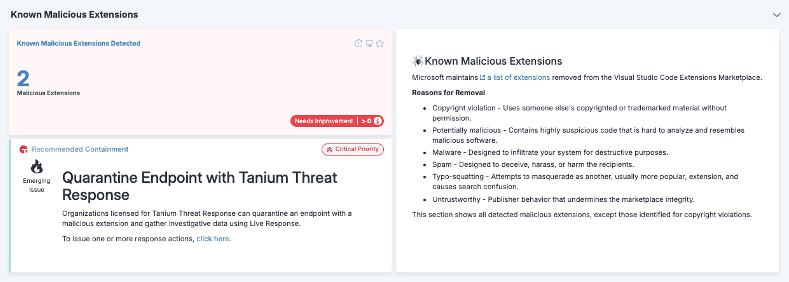
A blocklist is maintained by Microsoft, with VS Code automatically removing extensions on this list from the user’s endpoint. Microsoft has also added “name squatting” detection so that nefarious actors cannot steal the names of products/offerings from reputable official publishers. Users can report malicious extensions as well, and Microsoft has outlined their enhanced measures in its Developer Blogs.
Despite these increased measures, malicious extensions have slipped through. In early 2025, researchers at ReversingLabs uncovered a crafty use of a loophole that allowed malicious extensions to publish under the name of old-but-removed extensions in the marketplace. In the ReversingLabs research, the malicious extension included elements of ransomware. While not widespread, this is evidence of testing and development that can lead to larger compromises in the future.
While Microsoft does implement protections against known malicious extensions, other marketplaces exist. The OpenVSX Registry is a popular marketplace for the VS Code forks, such as Codeium, Windsurf, and VSCodium.
OpenVSX is completely open and lacks the sophistication of governance and security that Microsoft’s marketplace offers. While there is an abuse reporting process and the OpenVSX maintainers do respond to reports and takedown malicious extensions, the testing and scanning is not automated.
Given the popularity of many VS Code forks, OpenVSX will remain a high-risk delivery mechanism for malicious IDE extensions, and organizations who leverage this marketplace should implement strict allow-listing for their IDEs and routine scanning for presence of potentially nefarious content.
Extensions sourced from marketplaces are typically auto-updated by the IDE. This could introduce supply chain risks; if an extension developer is compromised or the extension is sold to a nefarious party, malicious code could be injected into an otherwise reputable extension.
Conversely, extensions can contain vulnerabilities as shown by CVE-2025-52882 in the Claude Code extension. In October of 2025, researchers at Wiz identified several publishers leaking secrets that could have led to compromise of hundreds of thousands of users.
Tanium insights
The IDE Extension landscape is sprawling. While many organizations regularly manage and update the IDEs themselves, not all dive into the control and management of IDE Extensions, which present a far greater risk. As with all things security, visibility into the ecosystem is the first—and most critical—step.
Tanium has observed at least one IDE is installed on 43% of macOS endpoints and 9% of Windows endpoints, with the average observed organization having 330 unique VS Code extensions installed.
Any organization that permits the use of IDEs must manage the risks associated with the use of IDE extensions. Developer endpoints are particularly high-value targets. Late 2025 saw a surge in attacks where malicious npm packages were being leveraged to harvest developer credentials and tokens.
Some organizations may think they are immune to these attacks because they do not develop software in-house or have a software development organization, but this would be a risky assumption. Many tech-savvy professionals outside of software engineering also use these code editors for building simple automation scripts to support their workflows.
Unless your organization is actively blocking VS Code and all its variants, you likely have exposure that warrants further monitoring and hardening.
How Tanium helps
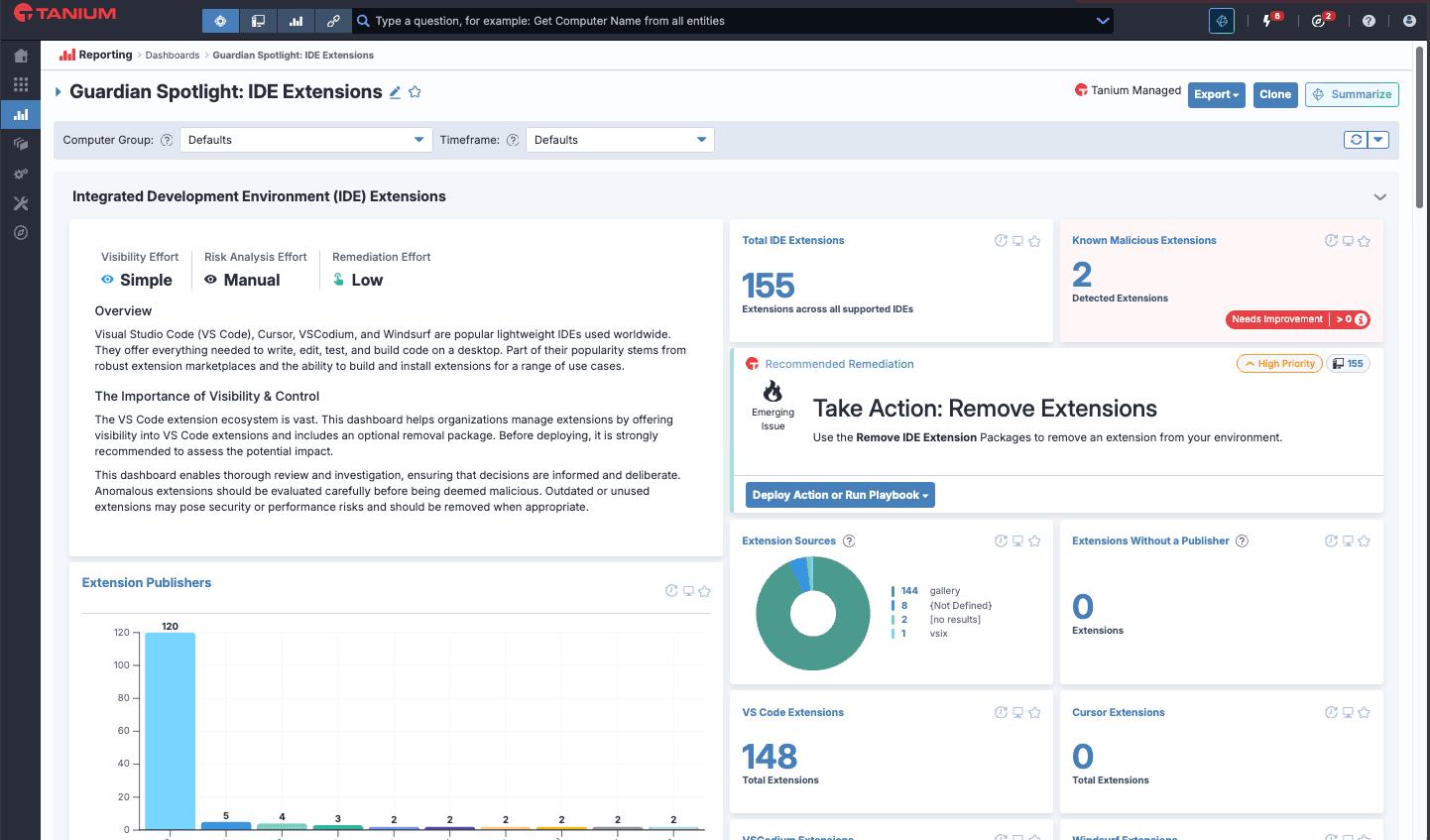
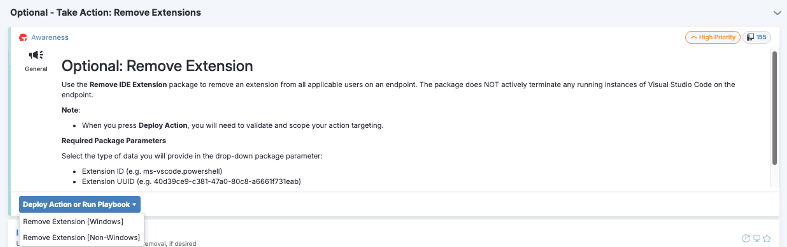
Tanium Guardian offers visibility and control for IDE extensions:
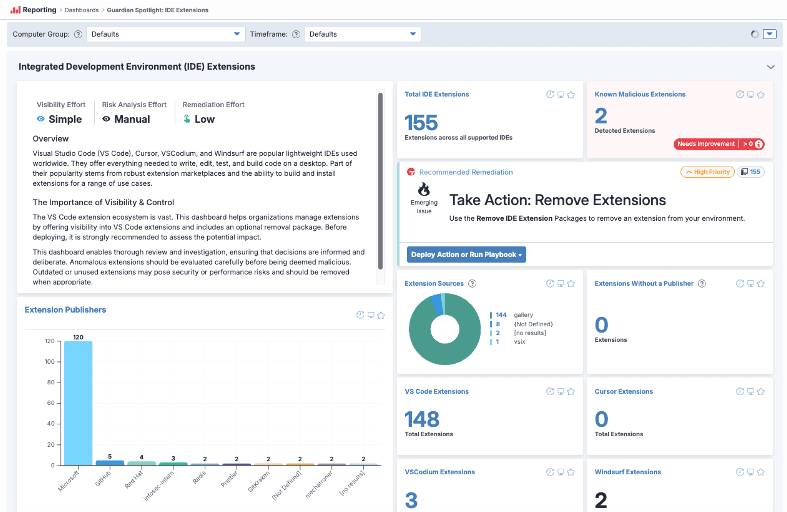
- Enumerate extensions: installed and disabled extensions across VS Code, Cursor, VSCodium, and Windsurf
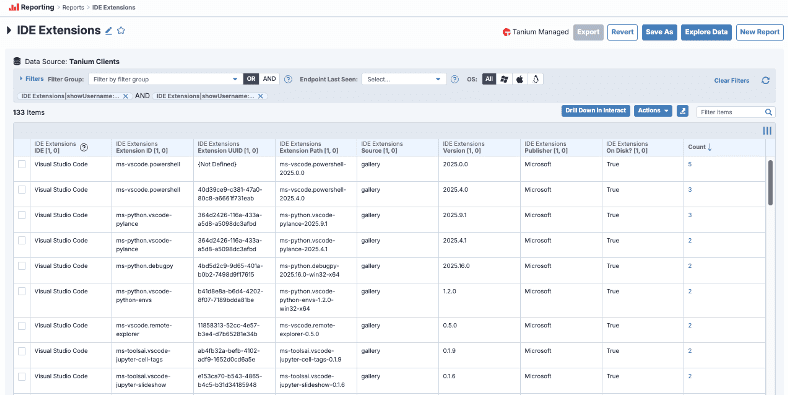
- Surface key metadata: extension ID, publisher, source (Marketplace vs. local), and version
- Remediate at scale: instantly remove malicious or non-compliant extensions using Tanium’s remove-extension package
Additional resources
- Visual Studio Extension Marketplace documentation
- Visual Studio Extension Marketplace protections
- Microsoft Dev Blog: Security and trust in Visual Studio Marketplace
- Overview of Tanium Guardian features and capabilities
- Watch how Tanium Guardian surfaces real-time risk: New SMB and RMM dashboards explained - Tanium Tech Talks #134