
UPDATE: This post, originally published on November 18, 2020, has been refreshed to reflect the evolving role of patch management in modern cybersecurity. It features expanded guidance on patching strategies, updated risk and compliance insights, and new real-world examples of how Tanium enables scalable, autonomous patching across complex environments.
Once considered routine, patch management is now a frontline defense against fast-moving threats. As vulnerabilities are discovered daily across endpoints, organizations are under constant pressure to identify, prioritize, and remediate them before attackers can exploit the gaps.
Patching can often feel like a time sink, especially when slowed by outdated methods like spreadsheets, vendor portals that require manual pulls, and fragmented coordination workflows that can’t keep up with modern threats.
While these approaches may have worked when environments were smaller and threats less sophisticated, they fall short amid today’s speed and complexity.
As patching delays accumulate and security debt grows, organizations must rethink their approach to patch management—not because patching is inherently difficult, but because traditional methods weren’t built for dynamic environments, expanding attack surfaces, and accelerating threat cadence.
That’s why organizations are turning to automation to equip teams with the speed and consistency needed to reduce risk at scale by streamlining repetitive tasks, eliminating manual bottlenecks, and accelerating response times.
In this blog, you’ll get a clear, up-to-date view of what patch management really means today and why it’s become a critical pillar of modern cybersecurity. We’ll explore the core purpose of patching, the different strategies organizations use, and the growing challenges of managing vulnerabilities in enterprise environments.
We’ll break down the six essential steps of a modern patch management workflow, highlight the risks of manual approaches, and show how automation can enhance every patching phase from identification to continuous improvement.
Finally, we’ll explore the tangible benefits of automation, including speed, scalability, and operational efficiency, so you can build a patching strategy that’s not only effective, but resilient and future-ready.
Why is patch management important for cybersecurity?
Patch management plays a critical role in cybersecurity by proactively closing known security gaps and supporting broader goals like defense-in-depth, regulatory compliance, and operational resilience. It is the structured process that governs how patches like software updates are identified, tested, and deployed across an organization’s infrastructure. It ensures systems remain secure, stable, and compliant.
As cyber threats grow more sophisticated and frequent, patch management helps limit exposure and strengthen defenses by:
- Reducing the attack surface: Unpatched systems are low-hanging fruit for attackers, and the number of known vulnerabilities continues to rise year over year. Without a structured patching strategy, even well-resourced teams can struggle to keep up.
“Ransomware groups are relying more heavily on older, previously exploited vulnerabilities rather than investing resources into developing exploits for newly published ones. This aligns with a broader trend of attackers leveraging ‘low-hanging fruit,’ namely organizations with more lax security implementation or perhaps a lack of active vulnerability management, to maximize efficiency.1”GRIT 2025 Ransomware & Cyber Threat Report
- Improving security posture: Patch management ensures that security controls remain effective across all endpoints. It’s a key component of a defense-in-depth strategy, especially as organizations adopt hybrid and multi-cloud environments.
- Enabling proactive risk reduction: Rather than reacting to incidents, patch management allows teams to proactively mitigate risk. This includes prioritizing patches based on severity, exploitability, and business impact.
To fully understand how patch management supports cybersecurity and operational resilience, it helps to look at the purpose of patching itself.
What is the purpose of patching?
Patching is the tactical act of updating software and devices to fix issues, improve performance, and close security gaps. It represents the “what” behind the broader “why” of patch management, serving as a foundational action that enables secure, stable, and high-performing systems.
While patch management is about the process and strategy, patching itself is about the intent and outcome of each update, including:
Fixing security vulnerabilities
Patches are often released to address known security flaws that could be exploited by attackers, whether in operating systems, productivity tools, or third-party applications. These security patches are critical for reducing exposure across the entire software stack, including third-party apps that may not be covered by default OS update mechanisms.
[Discover how security automation can transform your threat response]
Threat intelligence reports consistently show that attackers exploit vulnerabilities within days or even hours of disclosure.
This pattern of rapid weaponization is especially dangerous for high-impact vulnerabilities listed in CISA’s Known Exploited Vulnerabilities catalog.
Ensuring stability and reliability
Not all patches are about security. Many address bugs that cause devices to crash, misbehave, or underperform, which are all issues that can lead to data corruption, degraded performance, or even system-wide failures. Regular patching helps maintain the reliability of critical systems, reduces user frustration, and minimizes the risk of cascading disruptions.
For example, a patch might resolve a memory leak in a productivity app that causes slowdowns after extended use.
Common types of patches to know
• Security updates: Fix known vulnerabilities that could be exploited
• Bug fixes: Resolve software errors that cause crashes, glitches, or incorrect behavior
• Feature updates: Introduce new capabilities or improve existing functionality to enhance user experience
These patches are applied across different parts of the IT environment—ranging from endpoints and applications to server patch management, where uptime requirements, dependencies, and blast radius introduce additional operational complexity.
Enhancing performance and features
Patching isn’t just about fixing what’s broken; it’s also a vehicle for improvement. Many updates introduce new capabilities, optimize existing functionality, or streamline workflows to better align with evolving business needs. This is especially valuable in remote or hybrid environments where software agility directly impacts productivity.
For example, a patch might add UI improvements or expand functionality, often without requiring a full version upgrade. This allows organizations to innovate incrementally and maintain a competitive edge by delivering improvements faster, reducing disruption, and responding more quickly to user needs and market demands.
Maintaining compatibility
As operating systems, browsers, and hardware evolve, patches ensure that applications remain functional across diverse environments. Without regular updates, even well-built software can become unstable or incompatible, leading to errors, crashes, or degraded performance.
This is especially critical in organizations with varied tech stacks or distributed teams, where consistency across platforms is essential for collaboration and uptime.
Supporting compliance requirements
Many regulatory frameworks require that systems be kept up to date, and patching is essential to meeting those expectations. It helps organizations demonstrate due diligence, maintain audit readiness, and avoid costly penalties for noncompliance.
In industries like healthcare, finance, and government, promptly addressing known vulnerabilities is not just best practice; it’s also a legal obligation. Regulatory frameworks like HIPAA, PCI DSS, and ISO/IEC 27001 require timely remediation of known vulnerabilities.
While patching addresses the immediate needs of software health and security, managing patches across an enterprise is a much broader challenge. That’s where the patch management process comes in, not just to apply patches but to do so consistently, strategically, and at scale.
How does the patch management process work?
While the core steps of effective patch management are widely recognized across the industry, execution often varies depending on a team’s maturity, tooling, and scale.
The following six-step workflow blends industry recognized patching best practices with real-world insights to support teams in building a reliable, repeatable patching process regardless of where they are in their journey.
Step 1: Identification
This step involves discovering vulnerabilities across operating systems, software applications, and networked environments. Teams typically rely on vulnerability scanners, CVE databases, and integrated asset management solutions to ensure accurate targeting and prioritization by determining which systems are affected and what available patches are applicable based on vendor advisories and internal assessments.
In more mature environments, this process may also include real-time visibility into endpoint states, configuration management data, and vulnerability assessment results to guide prioritization based on business impact, exploitability, and asset criticality.
Mapping vulnerabilities to business services and owners during this step also helps ensure that remediation efforts are aligned with operational risk. To support alignment, many organizations rely on a broader risk assessment framework—one that incorporates organizational risk tolerance, threat likelihood, and business priorities.
Step 2: Acquisition
Once vulnerabilities are identified, patches are typically sourced from software vendors or trusted repositories. This can be done manually by downloading updates from vendor portals or through centralized repositories maintained by IT departments.
Some organizations define patch inclusion/exclusion rules based on system roles, compliance requirements, or business-critical functions.
This often includes prioritizing third-party patches and application patching for widely used software that may not be covered by default OS update mechanisms.
In more advanced setups, patch sourcing may be streamlined through tools that monitor for new releases and validate patch authenticity and compatibility before distribution.
Step 3: Testing
Before deploying patches to production environments, teams often test patches in a controlled setting (such as a lab or sandbox) to validate stability. Patch testing helps ensure that updates don’t introduce regressions, break dependencies, or disrupt business-critical services.
This testing should follow a phased or ring-based approach, starting with development or low-risk systems and gradually expanding to broader environments. Teams may also define rollback criteria or health checks to monitor for unintended side effects during testing.
Step 4: Deployment
Patches are deployed based on urgency, risk, and business impact. This may involve manual installation during maintenance windows or phased rollouts to minimize disruption. Change control processes are often used to document and approve deployments.
In some environments, end users receive advance notifications or are given options to defer updates within defined limits. These communications help reduce disruption and improve transparency during patching cycles.
While deployment can be fully manual, many organizations adopt a hybrid approach that combines human oversight with repeatable workflows to ensure consistency across systems, including third-party applications.
Step 5: Verification and compliance
After deployment, it’s essential to verify that patches were successfully applied and that systems are compliant. This supports audit readiness and regulatory accountability.
Re-scanning systems helps identify any missing patches or failed software updates. Additionally, maintaining detailed logs and audit trails supports regulatory compliance management and accountability.
Step 6: Continuous improvement
Each patch cycle offers an opportunity to refine the process. Teams may review patch success rates, identify bottlenecks, and adjust testing or deployment strategies accordingly. Lessons learned can be incorporated into documentation and shared across teams.
Strong collaboration between security, IT, operations, and compliance teams is essential to evolving patch workflows and building long-term resilience.
However, while collaboration is foundational, execution is what determines success. Patch management can only deliver on its promise—strengthening security, supporting compliance, and improving operational stability—when it’s executed effectively.
Let’s explore the real-world impact of unpatched vulnerabilities and why modern patch management strategies must go beyond manual methods.
Understanding the limits, challenges, and potential consequences of manual patching
When teams rely on outdated or unreliable patch management tools and methods, it can introduce delays and increase the risk of missed updates. Manual patching is rarely sustainable at scale and often increases IT workloads, strains resources, raises the risk of human error, and slows response times that leave critical vulnerabilities exposed far beyond safe thresholds.
In complex IT environments with thousands of endpoints that span physical, virtual, and cloud systems, manual patching often results in:
- Inconsistent coverage due to incomplete inventories or lack of visibility
- Delayed remediation that leaves known vulnerabilities unaddressed, increasing the risk of unauthorized access or data loss
- Audit and compliance gaps from unreliable tracking
- Operational disruptions caused by patching without system readiness insights
- Unexpected downtime from untested updates
And the security risks of unpatched vulnerabilities are not theoretical—they’re proven. Unpatched software and systems are prime targets for cyberattacks, malware infections, and data breaches. Hackers often exploit known vulnerabilities within days of disclosure, making timely patching essential.
Among the most common reasons organizations delay patching is the complexity of coordinating updates across diverse systems and teams, which can leave critical vulnerabilities exposed.
But even when patches are available, failure to act swiftly can have devastating consequences. One of the most well-known examples of delayed patching consequences is the WannaCry ransomware attack.
Real world example: WannaCry
In 2017, the WannaCry ransomware attack infected 200,000 computers across 150 countries, with total damages ranging from hundreds of millions to billions of dollars. While the attack was devastating, it could have been avoided: Two months prior to the attack, Microsoft released a patch (MS17-010) to fix the vulnerability in its Windows operating system that WannaCry ultimately exploited.
Recognizing the consequences of unpatched systems and the known limitations associated with manual patching is the first step toward building a more resilient strategy. As organizations grow and their environments become more complex, they must move beyond manual workflows toward solutions that provide real-time visibility into endpoints and centralized control over patching operations.
At the heart of this evolution is automation—not just as a convenience, but as a critical enabler of consistency, speed, and risk reduction in modern patch management.
[Explore how IT automation streamlines operations and boosts efficiency]
How to incorporate automation to evolve patching workflows
While the foundational patch management workflow can be executed manually, automation helps teams optimize every phase by improving consistency, minimizing human error, and accelerating response to emerging threats.
Here’s how automation strengthens each stage of the workflow:
- Identification: Enables continuous vulnerability detection and real-time asset visibility, helping teams respond faster and prioritize more effectively.
- Acquisition: Monitors trusted sources for new patches, validates them, and builds patch lists based on predefined policies, helping reduce manual overhead and human error.
- Testing: Supports ring-based testing, rollback gates, and health checks, allowing teams to simulate patch impact and catch regressions early.
- Deployment: Manages scheduled rollouts, phased deployments, and user deferral options through workflows that respect change control and maintenance windows.
- Verification and compliance: Automates re-scans, dashboards, and audit logs to ensure patches are applied successfully and compliance is maintained across all endpoints. A well-defined patch management policy ensures consistency, accountability, and alignment with regulatory requirements.
- Continuous improvement: Analyzes historical patch data to optimize future cycles, predict failures, and refine deployment strategies.
The good news is that automating a patching workflow doesn’t require a full overhaul. Many teams start small by targeting repetitive tasks while keeping human oversight where it matters. Even incremental automation can deliver outsized returns.
In the next section, we’ll explore the tangible benefits organizations can expect as they scale automation across their patch management lifecycle.
Benefits of automated patch management
As environments grow in complexity, patch management automation helps organizations move from reactive patching to proactive, scalable, and resilient operations. Here’s how:
- Faster response to threats: Automation eliminates manual bottlenecks, enabling rapid patch deployment and shrinking exposure windows.
- Scalability across environments: Whether managing hundreds or thousands of endpoints, automation ensures consistent patching across physical, virtual, and cloud-native systems.
- Improved consistency and workflow efficiency: Automated processes reduce human error, streamline patch lifecycles, and maintain system integrity.
- Proactive cybersecurity posture: Continuous detection and faster remediation help teams stay ahead of vulnerabilities.
- Reduced infrastructure and operational overhead: Automation minimizes the need for patch servers, custom scripts, and manual updates, and is especially valuable in hybrid or cloud-first environments.
- Stronger compliance and audit readiness: Automated patching supports policy enforcement and simplifies regulatory reporting.
- Healthier IT workflows and work-life balance: By removing the need for late-night patch windows and emergency fixes, automation helps reduce burnout and supports better work-life balance.
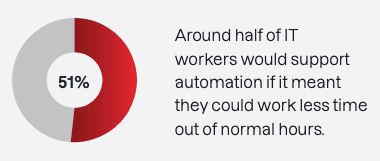
From speed and scale to stronger security and smoother operations, automation transforms modern patching systems into a strategic advantage. But how does it really stack up against manual methods? Let’s break it down.
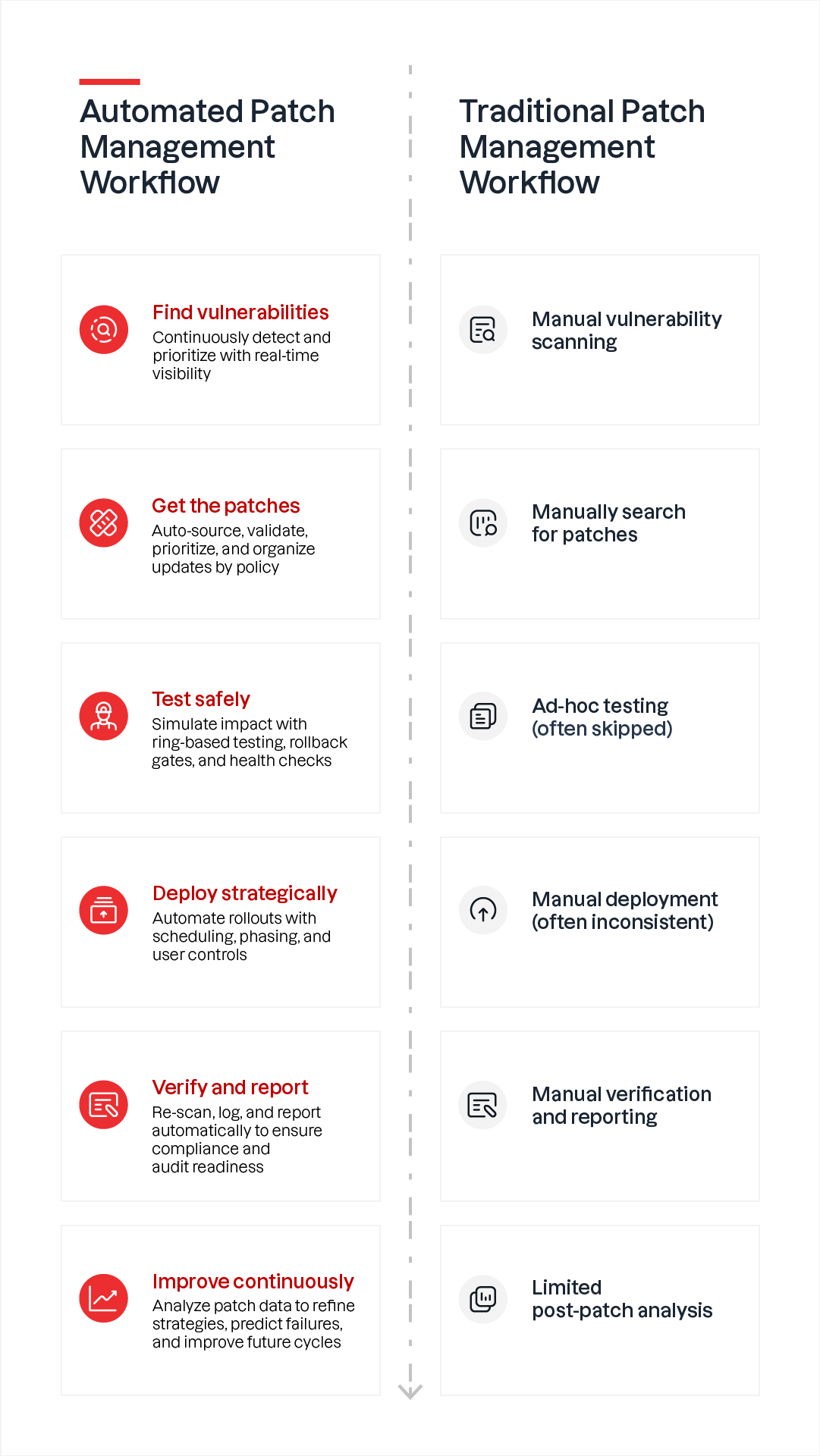
Key differences between manual and automated patch management
Manual patching has its place—but automation changes the game. Here’s how they compare:
| Manual patch management | Automated patch management | |
|---|---|---|
| Time to patch | Slower, often lags behind threat timelines | Faster, aligns with shrinking exploit windows |
| Resource use | High, strains IT teams | Low, frees IT for strategic tasks |
| Error rate | Higher, prone to human error | Lower, consistent and repeatable |
| Scalability | Limited in large environments | Scales easily across endpoints |
| Visibility and coverage | Often incomplete | Near-total coverage within hours |
| Network impact | Can cause strain or outages | Optimized for minimal disruption |
| Cost | Higher due to delays and breaches | Lower due to efficiency and prevention |
| Security posture | Reactive, often leads to patch delays | Proactive, reduces exposure |
| Compliance | Time-consuming | Streamlined and auditable |
| Innovation support | Slows down IT agility | Enables faster innovation |
Disclaimer: This table is intended for illustrative purposes only and reflects common operational differences observed across enterprise environments. It does not represent statistically validated data, and actual results may vary based on organizational context.
This contrast highlights how automation not only accelerates patching but also transforms it into a strategic enabler for IT and security teams. With these differences in mind, the next step is identifying a patching solution that aligns with your organization’s needs and maturity.
Choosing the right patch management solution
Selecting a patch management solution is a strategic decision that directly influences an organization’s security posture, operational efficiency, and ability to respond to emerging threats. Given the pace at which vulnerabilities are discovered and exploited, patching must be treated as a core security function that demands speed, visibility, and strategic execution.
Modern patch management software must scale with your IT infrastructure by supporting diverse operating systems and deployment models whether your systems are cloud-based, hybrid, or on-premises. It must also offer real-time visibility into assets, automate remediation workflows, and ensure consistent compliance across diverse systems and endpoints. Without these capabilities, organizations risk falling behind on critical updates, increasing their exposure to cyberattacks and compliance failures.
When assessing options, look for platforms that:
- Deliver comprehensive visibility into patch status across operating systems, applications, and third-party software
- Support fast, reliable deployment with minimal disruption to users
- Include validation and reporting tools to confirm patch success and identify gaps
- Integrate with existing IT service management and security operations tools
- Scale easily to support distributed and hybrid environments
- Enable customizable workflows and enforcement policies tailored to business needs
- Provide real-time compliance dashboards for audit readiness and executive reporting
[See how AI automation is reshaping IT workflows]
Automation plays a key role in modern patching solutions. By minimizing manual effort and enabling faster response times, an automated patch management tool helps teams stay ahead of threats while freeing up resources for strategic initiatives.
When integrated into a holistic autonomous endpoint management (AEM) strategy, patching also becomes part of a unified system that reduces tool sprawl, enhances visibility and control, and drives operational clarity across complex environments.
The best patching solution must also align with your team’s risk profile, scale with your environment, and help you maintain security without slowing you down. It’s not just about staying current, but staying secure, resilient, and ready.
Tanium’s approach to automated patch management at scale
While many tools offer automation, Tanium enables true autonomy by executing patching workflows without manual initiation, guided by real-time endpoint intelligence and policy-based controls.
This capability is a cornerstone of Tanium AEM, where orchestrated patching reduces risk, accelerates response, and simplifies IT operations.
Powering this transformation is Zero Touch Automation, which packages complex patching tasks into fully autonomous workflows, eliminating manual, line-by-line execution and enabling continuous compliance.
Tanium offers several flexible patching methods to suit various organizational needs, including:
- Zero Touch: Automatically deploys the latest patches with minimal human intervention, enabling a continuous and autonomous patching process. This method is especially valuable for large enterprises managing thousands of endpoints across diverse environments.
- Lite Touch: Allows organizations to lock in a specific change control date for patching, ensuring dependency consistency and controlled rollouts. This approach supports phased deployments and aligns with business rhythms.
- Automation: Provides advanced orchestration benefits such as pre/post patching activities, timed phases of deployment, and reliability gates to ensure successful rollout and minimize disruption. These capabilities are often integrated with ITSM platforms like ServiceNow for end-to-end workflow automation.
From automation to autonomy
Tanium’s Zero Touch Automation represents a paradigm shift, moving beyond basic automation to a state of autonomous, self-healing infrastructure.
In this advanced state:
- Human intervention is minimized
- The system proactively maintains its security posture
- Patches are identified, downloaded, and applied without human intervention
- The process remains active and responsive to emerging threats, including zero-day vulnerabilities
🎥 See how Tanium’s Zero Touch Automation streamlines patching, from deployment to validation, across your entire environment. Whether used on its own or integrated with platforms like ServiceNow, Tanium helps teams patch faster, reduce risk, and eliminate manual effort.
Explore more how-to videos on Tanium patching:
- Tanium Tech Talks Patch FAQ series: Patching Windows Server 2012 ESUs, patch compliance reporting, automatic browser updates, Microsoft Office updates, patching new endpoints, and relative maintenance windows
- Linux patching
- Patching macOS and Ubuntu
- Patching with ServiceNow
- SQL cluster patching
- Tanium Patch customer success story
This level of autonomy drastically reduces operational burden and human error, enabling IT teams to focus on strategic oversight rather than routine operations. It also supports real-time visibility and control, ensuring compliance and resilience across the entire IT estate.
Real-world results: Highlighting successful patching outcomes from Tanium customers
ABB gained 180,000 productive hours using Tanium’s automated patching, reducing help desk calls and keeping operations running smoothly.
📖 Read the customer case study
🎥 Watch the customer video
“Our process prior to Tanium was meeting with users and manually patching.”ABB End-User and Factory Excellence Leader Sam Cook
Tanium gave the City of Phoenix a patching cycle that is repeatable, reliable, and fast—cutting the patching cycle by an impressive 75%.
📖 Read the customer case study
🎥 Watch the customer video
“With Tanium, endpoint patching has become robust, quick, and effective.”City of Phoenix CISO Shannon Lawson
Thanks to automation with Tanium, Honeywell's operational team now has less manual work to handle. Honeywell's patch managers can manually adjust patching schedules when necessary, and, in the process, they also gain full visibility into all patch records.
📖 Read the customer case study
🎥 Watch the customer video
“Now, with Tanium, we’ve crossed the 90% patch-compliance mark for three months in a row. That’s significant.”Honeywell IT Director Manish Chopra
Regis Aged Care used Tanium to transform its workstation patching compliance rate from 1% to a confidence-building 98%—all in two months.
📖 Read the customer case study
🎥 Watch the customer video
Patch management is no longer just a maintenance task; it’s a strategic imperative that’s central to reducing risk, maintaining compliance, and enabling operational agility. With the right tools and patch automation strategy, organizations can improve resilience, streamline operations, and free up teams to focus on what matters most.
10 ways Tanium improves patch management*
- Find and fix patches traditional tools miss
- Patch faster, respond sooner
- Achieve up to 99%+ patch visibility and coverage
- Patch everywhere—remote, mobile, on-premises
- Scan assets and assess patch status in real time
- Scale patching without straining infrastructure
- Unify patch workflows in a single platform
- Automate the full patch lifecycle—from detection to deployment
- Eliminate the need for patch distribution servers
- Go autonomous with Tanium AEM and Zero Touch Automation
*The capabilities and outcomes described are based on Tanium product documentation, validated customer case studies, and real-world usage. Actual results may vary depending on deployment environment, configuration, and organizational maturity. All performance metrics reflect reported outcomes from Tanium customers and are not guaranteed.
Patch management FAQs
Let’s clear up some common questions about patch management.
How does patch management differ from vulnerability management?
Vulnerability management identifies the "what”—all potential weaknesses across IT assets, including software flaws, misconfigurations, and missing controls. Patch management delivers the “how” for remediating a significant portion of those weaknesses, particularly those with vendor-issued updates or validated fixes.
An effective vulnerability management program depends on a robust patch management capability to close identified gaps quickly and reliably. However, traditional approaches often rely on periodic scans and siloed data, leaving organizations without visibility into real-time risk and slow to respond.
Patch management acts as the execution arm of vulnerability management to deliver validated fixes for known software vulnerabilities and related system-level exposures. To reduce risk effectively, both must operate as a unified workflow where detection, prioritization, and remediation are tightly integrated.
To clarify how these two disciplines complement each other and where their responsibilities diverge), here’s a side-by-side comparison across core functions and focus areas:
| Aspect | Vulnerability management | Patch management |
|---|---|---|
| Definition | A continuous process for identifying, assessing, prioritizing, and tracking all types of security weaknesses across IT assets | An operational process for remediating known vulnerabilities through updates, configuration changes, and system-level fixes |
| Scope | Encompasses all weaknesses: software flaws, misconfigurations, outdated protocols, and poor access controls | Focuses on remediable vulnerabilities: primarily those with vendor-issued patches, configuration changes, or validated mitigation steps |
| Primary goal | Reduce overall risk exposure by identifying and managing all potential attack vectors | Prevent exploitation and maintain system integrity by applying timely and validated fixes |
| Key activities | Asset discovery, vulnerability scanning, risk scoring, prioritization, and reporting | Patch identification, testing, deployment, configuration updates, rollback planning, and compliance validation |
| Relationship | Provides the “what” and “why” of remediation; relies on patch management and other controls to execute fixes | Executes the “how” of remediation; applies updates based on vulnerability intelligence and operational readiness |
| Operational role | Typically led by security teams focused on risk reduction and threat mitigation | Often owned by IT operations teams, with increasing collaboration from security for prioritization and validation |
| Strategic role | Drives strategic risk reduction by identifying and prioritizing weaknesses across the environment—enabling informed decisions and targeted remediation | Executes timely and validated fixes to close known gaps—ensuring operational resilience and reducing exposure windows |
What does effective endpoint management have to do with patching?
Endpoint management provides the infrastructure and visibility needed for patching to succeed. Without knowing what devices exist and how they’re configured, patching lacks precision and confidence.
Patch management is a specialized function within endpoint management focused on identifying, testing, and deploying updates to fix vulnerabilities, improve stability, and ensure compliance.
In large, distributed environments, endpoints are constantly changing as new devices connect, configurations drift, and software versions vary. Without real-time visibility into every endpoint, organizations are left relying on outdated inventories or incomplete scans. This lack of visibility makes it nearly impossible to confidently identify which systems are vulnerable, prioritize patching based on risk, or verify that updates were successfully applied.
True endpoint awareness means knowing not just what is out there, but what state it’s in instantly and continuously. That level of precision transforms patching from a reactive chore into a proactive, risk-informed process.
What’s the best strategy to implement automated patching?
The best strategy for implementing automated patching isn’t just about replacing manual steps with scripts—it’s about rethinking the entire patching workflow to be risk-informed, policy-driven, and operationally resilient.
A modern, automation-ready patching strategy should be built on three core pillars:
- Visibility first: Know what you’re patching
Automation is only as effective as the data it acts on. Start by ensuring real-time visibility into your entire endpoint estate across operating systems, software applications, and configurations. This includes:
• Continuous identification of vulnerabilities and patch availability • Automated testing using ring-based or phased rollouts • Orchestrated deployment with rollback gates and health checks • Post-deployment validation with compliance reporting and audit trails • Feedback loops to refine future cycles based on success rates and exceptions
Without this foundation, automation risks reinforcing visibility gaps rather than eliminating them. - Policy-driven workflows: Define goals, not just tasks
Rather than hardcoding patching steps, define policy-based workflows that reflect your organization’s risk tolerance, IT compliance requirements, and operational rhythms like:
• Patch inclusions/exclusion rules based on asset criticality, compliance scope, or operational role • Maintenance windows and change control alignment • Risk-based prioritization using exploitability, CVSS, and business impact
This approach ensures automation adapts to your environment (not the other way around). - Closed-loop automation: From detection to validation
True automation doesn’t stop at deployment. An effective automated patch management solution should span the entire patch lifecycle, including:
• Continuous identification of vulnerabilities and patch availability • Automated testing using ring-based or phased rollouts • Orchestrated deployment with rollback gates and health checks • Post-deployment validation with compliance reporting and audit trails • Feedback loops to refine future cycles based on success rates and exceptions
This closed-loop model transforms patching from a reactive task into a proactive, self-improving process
A well-implemented automated patching strategy doesn’t just reduce manual effort, it:
• Shrinks exposure windows
• Improves compliance posture
• Frees up teams for higher-value work
• Supports healthier, more sustainable operations
Automation isn’t just about speed—it’s about enabling precision, resilience, and confidence in every patching decision.
As patching becomes more complex and critical, organizations need more than automation. They need intelligence, flexibility, and control. Tanium delivers all three. With Zero Touch Automation, Lite Touch flexibility, and integration across IT and security workflows, Tanium helps teams strengthen security, accelerate response, and manage patching at scale.
See how Tanium can help you modernize your patching strategy, reduce risk, and simplify operations—schedule a personalized live demo today.